Subforms
It is common to encounter situations where we need to collect similar information across different forms. Consider an application to manage items, where different types of items share a common set of attributes, such as name, description, price, and quantity. In this case, it would be necessary to replicate these fields across different forms, which is time-consuming and makes future maintenance of these forms difficult.
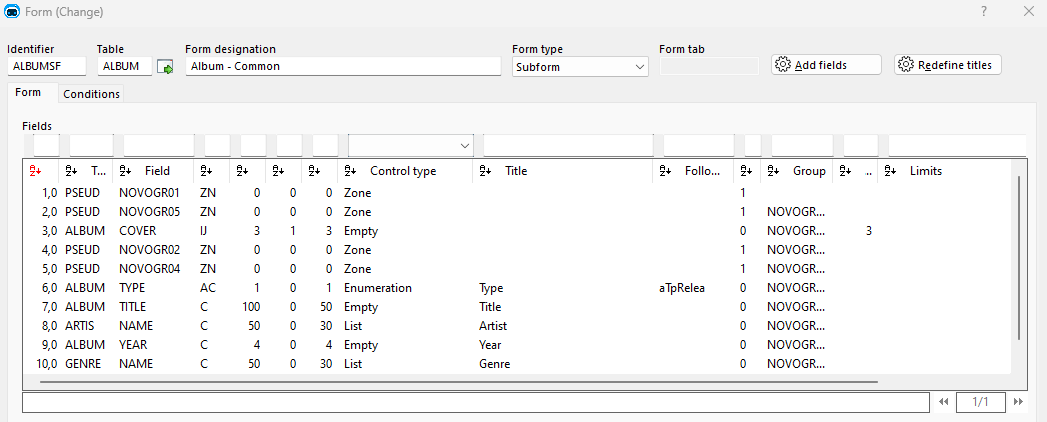
To address this issue, we are creating the concept of subform, which allows us to define a set of form fields once and reuse them across different forms. A subform is a type of form that contains a specific set of information to be embedded in other forms (e.g., header information to be repeated across multiple forms in the application).
Genio definition
The definition and usage of subforms in Genio is supported by:
- New form type "Subform": Subforms are forms that do not need to include all of the mandatory fields and can be included in other forms.
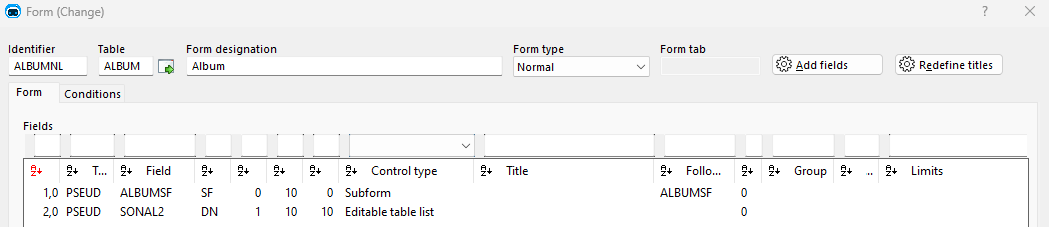
- New form field type "Subform": A styleless container where a subform will be displayed.
Implementation approach
This merge request represents the first of a series of steps towards achieving a flexible implementation of subforms.
In this first step, the generated code for a subform is very similar to the code generated for a tab:
- Server-side, the fields of the subform are merged with the fields of the main form in a single viewmodel
- Client-side, the subform is rendered inside a styleless container, instead of being displayed inside the tab control
Form editor support
The support for the subform feature will be gradually added to the form editor:
- Phase One: An empty area will be displayed to indicate the presence of the subform without showing its contents.
- Phase Two: For GenioWeb's form editor, the actual contents of the subform will be rendered.
Mandatory fields
Similar to what is done for forms with tabs, Genio ensures that all mandatory fields are present in forms with subforms. To achieve this, Genio checks not only the direct fields of the main form but also the fields of any subforms that may be present. For example, let's say there's a mandatory field called "Name" that must be included in the form. If the "Name" field is not found in the direct fields of the main form, Genio searches for it in the fields of any subforms that are included. If the "Name" field is not found in any of these places, the form is incomplete and will need to be edited to include the mandatory field.
Pitfalls
There are a few pitfalls to be aware of:
- It's important to keep track of the fields in both the subform and the main form to avoid duplicated fields.
- Independent subform viewmodels make server-side operations more difficult, as validation rules and database operations may be spread across multiple forms. It's important to have a clear understanding of how this will work before implementing independent subform viewmodels.
Next steps
As we continue to develop and improve our support for subforms, we have identified some areas for future work:
- Deprecate form type "PS" (Tabs): This form type can be deprecated in favor of making the form field type "PS" (Tab) act as a container that references subforms instead.
- Generate independent subform viewmodels: Rather than merging subform fields in the parent form, we aim to generate independent subform viewmodels. This will help to reduce code duplication and improve maintainability.
- Support for nested subforms: Currently, our support for subforms only extends to one level. We plan to enhance this support to allow for nested subforms, providing even greater flexibility in form design.
- Improved form editor support: While our current implementation of subforms in the form editor is functional, we plan to enhance it to make it even more intuitive and user-friendly.