Calendar
Calendar
The Calendar visualization mode allows the visualization of data as calendar events, supporting multiple views such as daily, weekly, and monthly layouts. It provides an intuitive interface for displaying date-related information, enabling users to easily navigate between periods, view event details, and manage time-based data.
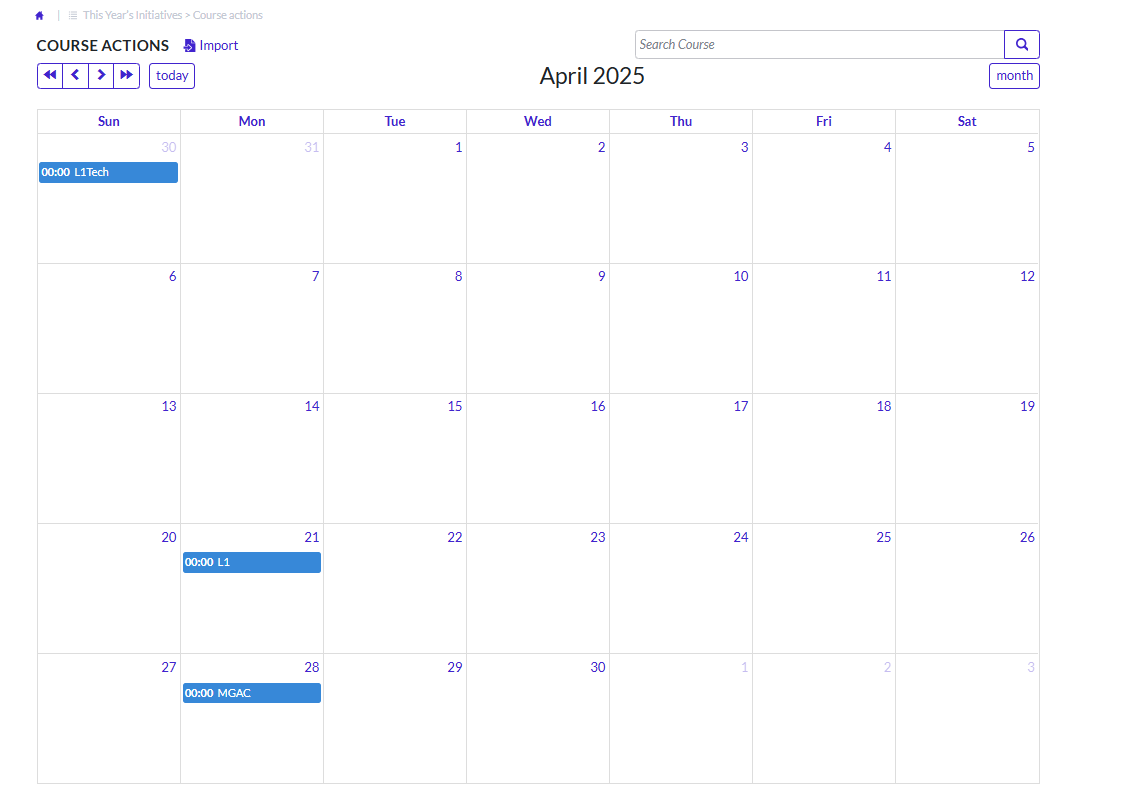 Figure 1. Calendar Visualization in the application
How to create?
-
Create a list of type Table List in the form where the calendar will be
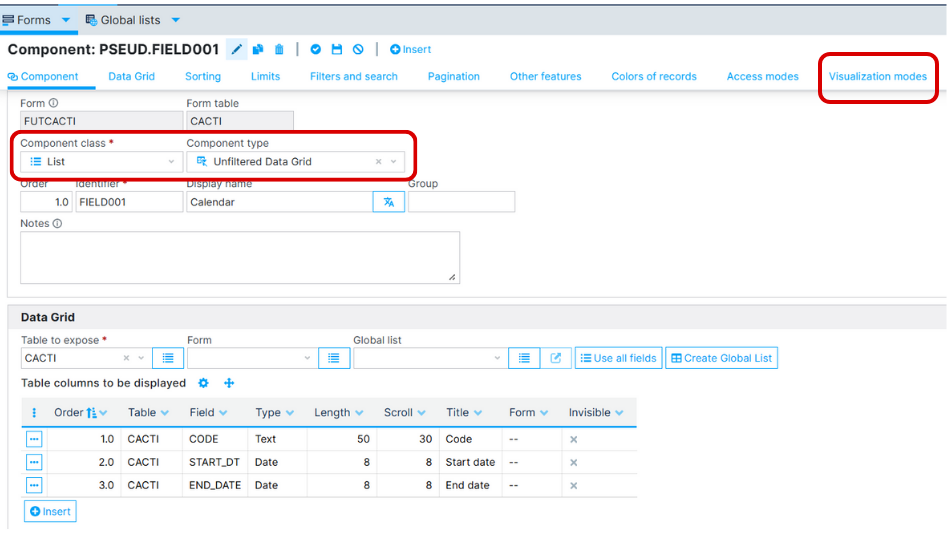 Figure 2. Create new table list
 -
Select the Visualization modes tab and insert a new one
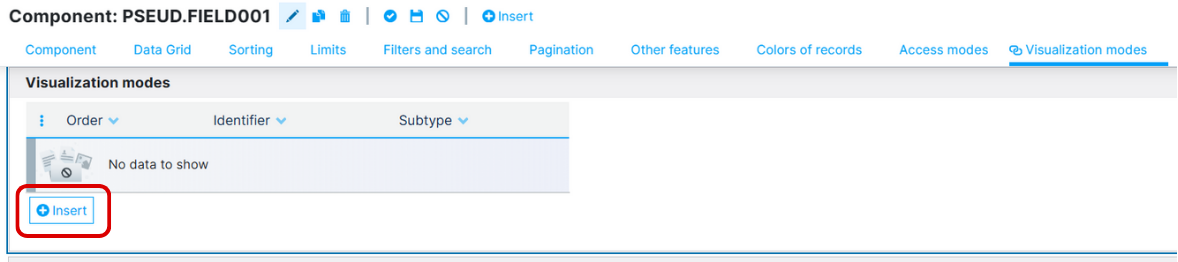 Figure 3. Insert new Visualization mode
- Insert a Calendar and its Variables
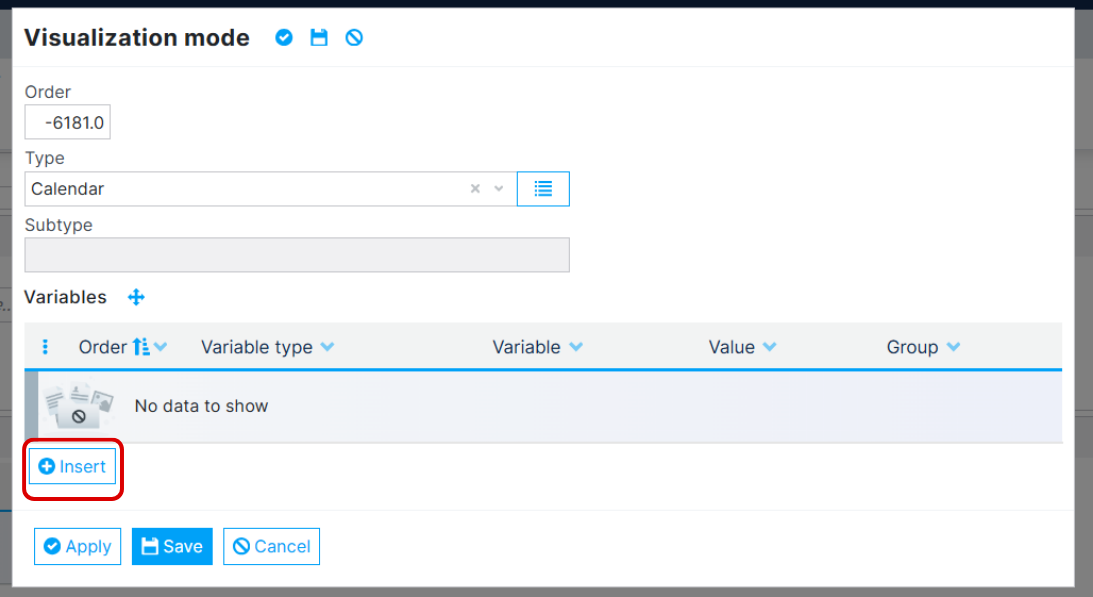 Figure 4. Insert the variables
Variables
| Name | Type | Description | Admitted Values | Default | ||
|---|---|---|---|---|---|---|
| event-title | Mapping | Text field that represents the title of the event | ----------- | -------------------------- | --------- | |
| event-start | Mapping | DateTime field that represents event's start date and time | -------------------------- | --------- | ||
| event-end | Mapping | DateTime field that represents event's end date and time | -------------------------- | --------- | ||
| event-description | Mapping | Text field that represents the description of the event | ----------- | -------------------------- | ---------------- | --------- |
| event-all-day | Mapping | Logical field that represents if the event is an all-day event | ----------- | -------------------------- | ---------------- | --------- |
| event-color | Mapping | . String. An alias for specifying the backgroundColor and borderColor at the same time | ----------- | -------------------------- | ---------------- | --------- |
| event-resource-id | Mapping | -------------------------- | ---------------- | --------- | ||
| event-is-background | Mapping | Logical field that represents if the event is a background event | ||||
| event-resource-title | Mapping | -------------------------- | ---------------- | --------- | ||
| event-group2-id | Mapping | 2-Level Grouping. A text field that uniquely identifies the resource group | ---------------- | --------- | ||
| event-group2-title | Mapping | 2-Level Grouping. A text field that represents the title of the resource group | ---------------- | --------- | ||
| event-group3-id | Mapping | 3-Level Grouping (additionally to the Scheduler's 2-level grouping fields; a text field that uniquely identifies the resource children. | ---------------- | --------- | ||
| event-group3-title | Mapping | 3-Level Grouping (additionally to the Scheduler's 2-level grouping fields; A text field that represents the title of the resource children | ---------------- | --------- | ||
| extra-event-start-time | Mapping | Time field that represents event's start time. (output) | ---------------- | --------- | ||
| extra-event-end-time | Mapping | Time field that represents event's end time. (output) | ---------------- | --------- | ||
| extra-event-selected-date | Mapping | Date field that represents event's selected date. (output) | ---------------- | --------- | ||
| view-day-grid-day | Configuration | Displays events in a single day view, in a grid layout with one row for each hour | true, false | --------- | ||
| view-day-grid-week | Configuration | Displays events in a multi-day view, in a grid layout with one column for each day and one row for each hour | true, false | --------- | ||
| view-day-grid-month | Configuration | Displays events in a month view, in a grid layout with one cell for each day | true, false | --------- | ||
| view-time-grid-day | Configuration | Displays events in a single day view, in a time-grid layout with one row for each event and columns for start time, end time and title | true, false | --------- | ||
| view-list-day | Configuration | Displays events in a single day view, in a vertical list with one row for each event and column. | true, false | - | ||
| view-list-week | Configuration | Displays events in a multi-day view, in a vertical list with one row for each event and columns for start time, end time and title and one section for each day | true, false | - | ||
| view-list-month | Configuration | Displays events in a month view, in a vertical list with one row for each event and column for start date and title | true, false | - | ||
| view-list-year | Configuration | Displays events in a list format, with one year per row. | true, false | - | ||
| view-resource-timeline-day | Configuration | Displays resources in a vertical timeline, with one day per column. Note: Premium view (License required) | true, false | - | ||
| view-resource-timeline-week | Configuration | Displays resources in a vertical timeline, with one week per column. Note: Premium view (License required) | true, false | - | ||
| view-resource-timeline-month | Configuration | Displays resources in a vertical timeline, with one month per column. Note: Premium view (License required) | true, false | - | ||
| view-resource-timeline-year | Configuration | Displays resources in a vertical timeline, with one year per column. Note: Premium view (License required) | true, false | - | ||
| view-resource-time-grid-day | Configuration | Displays resources and events in a time-grid layout, with one day per column. Note: Premium view (License required) | true, false | - | ||
| view-resource-time-grid-week | Configuration | Displays resources and events in a time-grid layout, with one week per column. Note: Premium view (License required) | true, false | - | ||
| view-resource-day-grid-day | Configuration | Displays resources in a day-grid layout, with one day per row and resource. Note: Premium view (License required) | true, false | - | ||
| initial-view | Configuration | The initial view that we want to see on the calendar. | dayGridDay, dayGridWeek, dayGridMonth, timeGridDay, timeGridWeek, listDay, listWeek, listMonth, listYear, resourceTimelineDay, resourceTimelineWeek, resourceTimelineMonth, resourceTimelineYear, resourceTimeGridDay, resourceTimeGridWeek | - | ||
| extra-weekends | Configuration | Whether to include Saturday/Sunday columns in any of the calendar views. | true, false | - | ||
| extra-events-overlap | Configuration | To allow the events to overlap. | true, false | - | ||
| extra-auto-height | Configuration | To allow the setting of the calendar's height to auto. | true, false | - | ||
| extra-max-height | Configuration | To allow the setting of the calendar's maximum height. Require autoHeight off. | true, false | - | ||
| extra-no-tooltips | Configuration | To remove the calendar events tooltips. | true, false | - | ||
| extra-all-day-slot | Configuration | Determines if the "all-day" slot is displayed at the top of the calendar. | true, false | - | ||
| extra-full-reload | Configuration | To reload the entire form, not only the calendar control. | true, false | - | ||
| extra-slot-min-time | Configuration | To allow the setting of the calendar minimum hour allowed (minimum starting time) | true, false | - | ||
| extra-slot-max-time | Configuration | To allow the setting of the calendar maximum hour allowed (maximum ending time). | true, false | - | ||
| extra-no-dates | Configuration | To remove the dates from calendar. Special extra options (require additional fields in Genio definitions) | true, false | - | ||
| extra-limit-range-start | Configuration | To allow the setting of the range of dates allowed in the calendar (start). | true, false | - | ||
| extra-limit-range-end | Configuration | To allow the setting of the range of dates allowed in the calendar (end). | true, false | - | ||
| extra-hour-12 | Configuration | Determines the hours format that will be displayed within a time slot and event time | true, false | - | ||
| extra-slot-duration | Configuration | The frequency for displaying time slots (e.g: 00:30:00). | true, false | - | ||
| extra-slot-label-interval | Configuration | The frequency that the time slots should be labelled with text (e.g: 00:30:00). | true, false | - |