Data Governance
Learn how to classify sensitive data, control who can access it, and prove your application is GDPR compliant.
Data Governance in Genio
Data Governance is where Genio makes GDPR compliance part of the model itself, rather than something bolted on afterwards. It lets you tag the fields that hold personal or sensitive data, decide who can see or edit them, keep a record of when they're read, state why that data is being kept, and produce evidence of all of this for a regulator, auditor or Data Protection Officer.
Everything described in this section is configured under Data > Data Governance:
- Data Classifications: create the classifications that matter for your product, assign them to Table Fields, and configure Role Behaviour and the Read Audit Log per classification.
- Processing Purposes: define why classified data is kept, and associate each purpose with the Tables and Data Classifications it applies to.
Data Governance & Privacy Overview
The Data Governance & Privacy page, also under Data > Data Governance, is a read-only dashboard that brings together everywhere Data Governance information shows up across the model. Filtering by Data Classification, it lists:
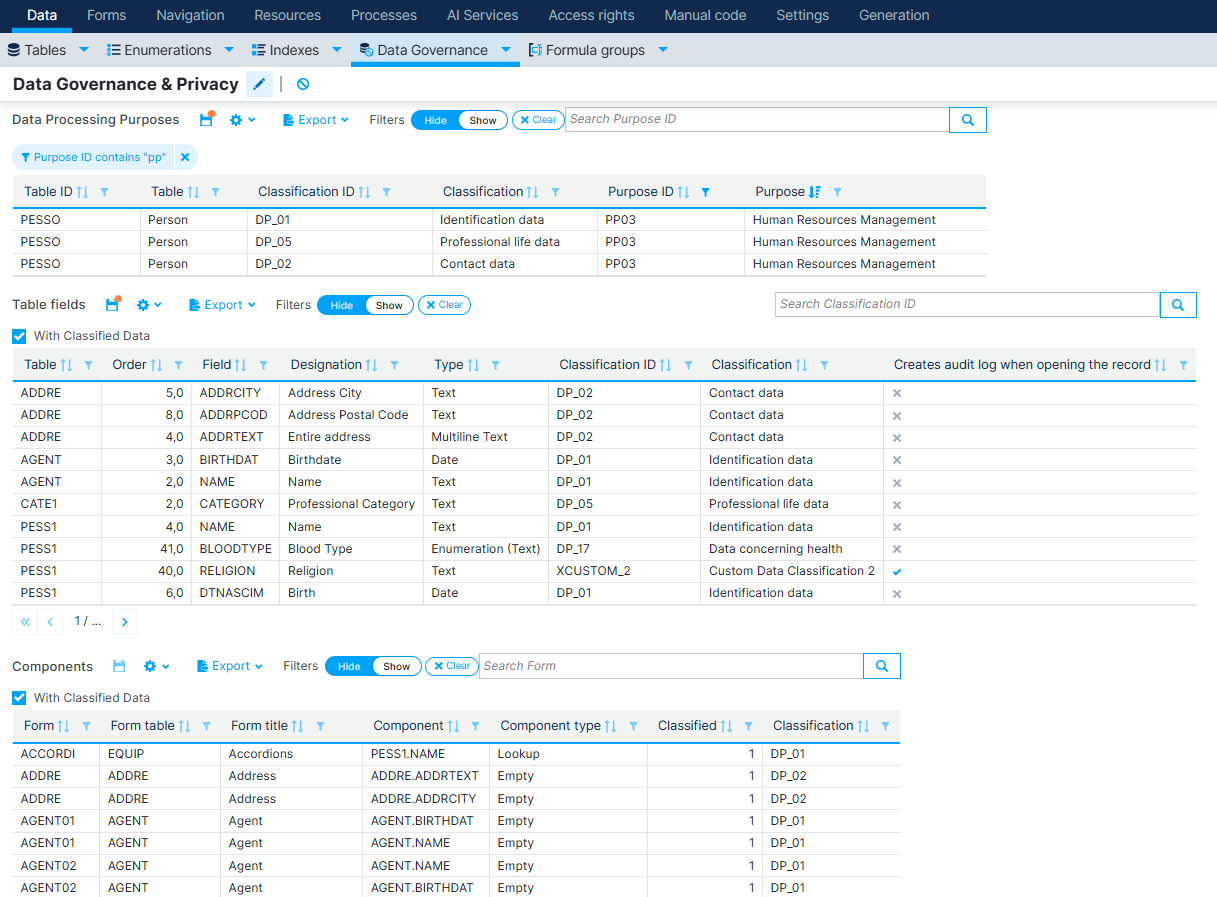
- Data Processing Purposes associated with each classified table;
- Table fields carrying a Data Classification, with their Type, Length, and whether they create an audit log;
- Components, Form List Columns, Global List Columns and Menu List Columns that correspond to classified fields.
Every list can be exported, making this page a convenient starting point to review — or hand over as evidence — everything that has been classified so far.
How Can You Make Your Application GDPR Compliant?
Making a Genio application GDPR compliant is a matter of working through Data Governance end to end:
- Classify your data. Create the Data Classifications that make sense for your product — using the predefined GDPR-aligned categories, or a custom one — and assign them to every Table Field that holds personal or sensitive data.
- Restrict access. For each Data Classification, configure a Default Behaviour and, where needed, stricter or looser Role Behaviour overrides, so only the right Roles can see or edit that data.
- Keep a read trail. Enable the Read Audit Log on classifications where simply viewing the data must be traceable, not just changing it.
- Document why the data is kept. Define Processing Purposes and associate them with the Tables and Data Classifications they justify.
- Review and export the evidence. Use the Data Governance & Privacy overview above during modeling, generate the Technical Documentation for a developer-facing record, and download the WebAdmin Export XML from the running application for a DPO, auditor, or compliance tooling.
For the legal reasoning behind this — why logging, authorisation, encryption and classification matter under the GDPR — see GDPR.