Data Classifications
Data Classifications
A Data Classification is a label that identifies a category of personal or sensitive data, in line with the GDPR. Once created, a Data Classification can be assigned to any Table Field that holds that kind of data, and it drives:
- what each Access Role is allowed to see or edit for that field (Role Behaviour);
- whether opening a record with that field creates an entry in the Read Audit Log.
Data Classifications are managed in Data > Data Governance > Data classification.
Creating and Configuring Data Classifications
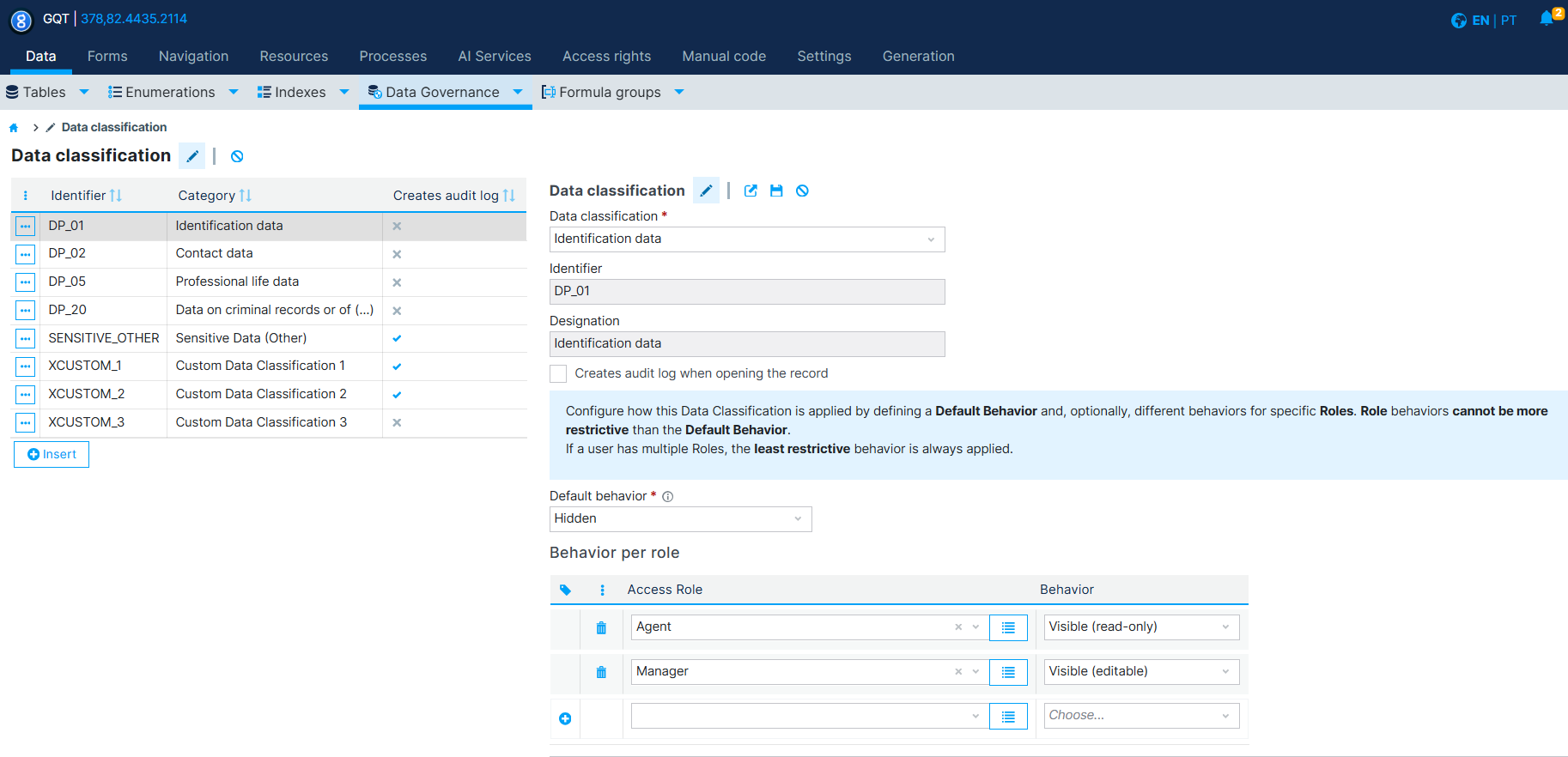
The Data classification list shows, for every classification already created, its Identifier, Category and whether it Creates audit log. Click Insert to create a new one.
Each Data Classification has the following properties:
- Data classification: the GDPR-aligned category this classification belongs to, chosen from a predefined list of 20 categories, or Custom category (specify) if none of them fits.
- Identifier: a unique code for the classification (e.g.
DP_XXin case of predefined categories, or another, in case of a custom category). - Designation: the human label of the classification (e.g. "Identification data", "Health-related data").
- Creates audit log when opening the record: see Read Audit Log per Data Classification below.
The predefined categories available in the Data classification dropdown are:
| Code | Description |
|---|---|
| DP_01 | Identification data |
| DP_02 | Contact data |
| DP_03 | Tax and billing data |
| DP_04 | Family life data |
| DP_05 | Professional life data |
| DP_06 | Financial and asset data |
| DP_07 | Traffic and location data |
| DP_08 | Internet browsing data |
| DP_09 | Other non-sensitive personal data |
| DP_10 | Profiles, inferences and evaluations |
| DP_11 | Racial or ethnic origin |
| DP_12 | Political opinions |
| DP_13 | Religious or philosophical beliefs |
| DP_14 | Trade union membership |
| DP_15 | Genetic data |
| DP_16 | Biometric data for unique identification |
| DP_17 | Data concerning health |
| DP_18 | Data concerning sex life |
| DP_19 | Data concerning sexual orientation |
| DP_20 | Data on criminal records or offences |
| CUSTOM | Other category (specify) |
Role Behaviour per Data Classification
On the Data Classification form, below the audit log option, is a note explaining how the classification is enforced:
Configure how this Data Classification is applied by defining a Default Behavior and, optionally, different behaviors for specific Roles. Role behaviors cannot be more restrictive than the Default Behavior. If a user has multiple Roles, the least restrictive behavior is always applied.
- Default behavior: the behavior applied to any Access Role without a specific override (e.g.
Hidden,Visible (read-only),Visible (editable)). - Behavior per role: an optional list of
Access Role/Behaviorpairs, letting specific roles see or edit the classified fields differently from the default. Use the + row to add another role/behavior pair.
This behaviour is applied to every field carrying that Data Classification, across every table, form and list where the field appears — it does not need to be configured field by field.
Read Audit Log per Data Classification
Checking Creates audit log when opening the record on a Data Classification means that, for every field carrying that classification, simply reading (opening) a record that contains it is logged — not just creating, updating or deleting it.
This complements the field-level Audit option (see Audit Data), which tracks changes to a field's value: the classification-level audit log is specifically about read access, which is what GDPR record-keeping and accountability (e.g. proving who accessed sensitive data, and when) require for personal and sensitive data.
Assigning a Data Classification to Table Fields
Once the Data Classifications that make sense for the product have been created, classify the Table Fields that hold that kind of data:
- Go to Data > Tables, open the table, and edit the field.
- In the field's Advanced options, set Content classification to the desired Data Classification.
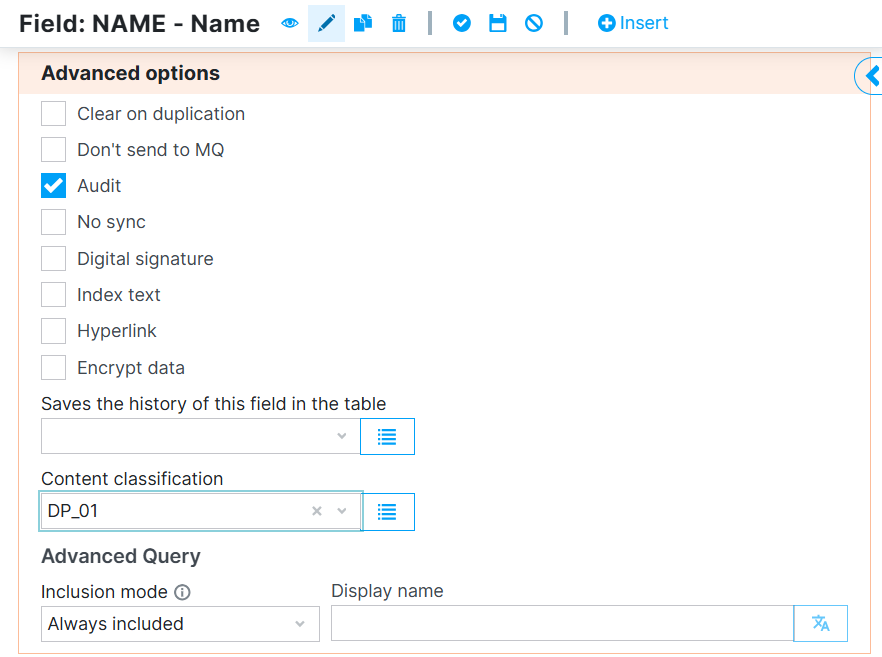
Only fields that actually contain personal or sensitive data should be classified — this is what the rest of Data Governance (role behaviour, audit log, processing purposes, exports and documentation) is built on.